Documentation
Everything you need to add security auditing to your test automation.
Framework Guides
QAstell supports multiple test automation frameworks with identical APIs. Choose your framework for detailed setup instructions and examples:
Playwright
Integration guide for Playwright E2E tests. Works with test fixtures, browser contexts, and all Playwright APIs.
View Playwright GuidePuppeteer
Integration guide for Puppeteer browser automation. Works with puppeteer and puppeteer-core.
View Puppeteer GuideSelenium WebDriver
Integration guide for Selenium WebDriver browser automation. Works with any WebDriver-compatible browser.
View WebDriver GuideCypress
Integration guide for Cypress E2E tests. Works with cy.window() for direct DOM access inside tests.
View Cypress GuideWebdriverIO
Integration guide for WebdriverIO browser automation. Works with Allure reporting and Mocha/Jasmine frameworks.
View WebdriverIO GuideCompatibility Matrix
| Feature | Playwright | Puppeteer | Cypress | WebDriver | WebdriverIO |
|---|---|---|---|---|---|
| Minimum Version | 1.40.0+ | 21.0.0+ | 12.0.0+ | 4.0.0+ | 9.0.0+ |
| Auto-detection | Yes | Yes | Yes | Yes | Yes |
| All 250+ security rules | Yes | Yes | 245+ * | 245+ * | 245+ * |
| HTML reports | Yes | Yes | Yes | Yes | Yes |
| JSON reports | Yes | Yes | Yes | Yes | Yes |
| SARIF reports | Yes | Yes | Yes | Yes | Yes |
| JUnit XML reports | Yes | Yes | Yes | Yes | Yes |
| Category filtering | Yes | Yes | Yes | Yes | Yes |
| Severity thresholds | Yes | Yes | Yes | Yes | Yes |
| Cookie inspection | Yes | Yes | Partial ** | Yes | Yes |
| HTTP response headers | Yes | Yes | No *** | No *** | No *** |
Note: All frameworks are optional peer dependencies. Install only the one you need.
* WebDriver, WebdriverIO, and Cypress run 245+ rules. ~5 header-based rules are skipped due to API limitations.
** Cypress can only inspect non-HttpOnly cookies via document.cookie. Use cy.getCookies() for full inspection.
*** WebDriver, WebdriverIO, and Cypress cannot access HTTP response headers. Use cy.intercept() or a proxy if header inspection is required.
License Configuration
Free Mode (Default)
QAstell works out of the box without any license key. By default, it runs in Free mode with:
- 10 scans per day
- All 250+ security rules
- HTML reports
- Non-commercial use only
Simply install and use - no registration or license key required:
npm install qastell
npx playwright test
Paid Licenses
For personal and commercial use or higher scan limits, set your license key via environment variable:
QASTELL_LICENSE="your-key" npx playwright testOr initialize in your test setup:
import { initLicense } from 'qastell';

// In playwright.config.ts or global setup
initLicense(process.env.QASTELL_LICENSE);
See pricing for Enterprise and Corporate plans.
Parallel Test Execution
QAstell tracks daily scan usage in a shared file in your home directory (%USERPROFILE%\.qastell\usage.json on Windows, ~/.qastell/usage.json on macOS/Linux). When running tests in parallel, keep these points in mind:
Environment variable is simplest: Set QASTELL_LICENSE as an environment variable and it will be automatically picked up by all worker processes - no initLicense() call needed.
Playwright Parallel Workers
Playwright spawns separate worker processes. Each worker needs access to the license. Use the environment variable approach:
# Set once, all workers inherit it
QASTELL_LICENSE="your-key" npx playwright test --workers=4
Or in playwright.config.ts:
import { defineConfig } from '@playwright/test';

export default defineConfig({
  workers: 4,
  // The QASTELL_LICENSE env var is automatically read by each worker
});
Scan Count with Parallel Execution
The scan counter is shared across all workers via the usage file. With highly parallel execution, the count may be approximate (within a few scans).
Corporate tier users: With unlimited scans, parallel execution has no restrictions.
Enterprise/Free tier users: If running many parallel workers, you may occasionally see scan counts slightly higher than actual usage due to race conditions.
What Happens When Quota Is Exceeded
When the daily scan limit is reached, QAstell skips the security audit rather than failing your tests. This ensures your CI pipeline continues running:
- A warning is logged to the console
- The audit returns empty results with
skipped: true assertNoViolations()passes (no violations to report)- Your test continues without interruption
You can check if an audit was skipped:
const results = await auditor.audit();

if (results.skipped) {
  console.log('Audit skipped:', results.skipMessage);
  // Optionally: test.skip() or mark as pending
}
Advanced Configuration
The SecurityAuditor constructor accepts an optional second parameter for advanced configuration:
const auditor = new SecurityAuditor(page, {
  // Force a specific framework (useful when auto-detection fails)
  framework: 'playwright' | 'puppeteer' | 'cypress' | 'webdriver',

  // Use custom security rules instead of the defaults
  rules: myCustomRules,
});
Force Framework Detection
QAstell automatically detects whether you're using Playwright, Puppeteer, or Selenium WebDriver. However, if you're using custom page wrappers or running into detection issues, you can force the framework:
// Force Playwright adapter
const auditor = new SecurityAuditor(page, { framework: 'playwright' });

// Force Puppeteer adapter
const auditor = new SecurityAuditor(page, { framework: 'puppeteer' });

// Force WebDriver adapter
const auditor = new SecurityAuditor(driver, { framework: 'webdriver' });
Check Detected Framework
You can verify which framework was detected:
import { SecurityAuditor, detectFramework } from 'qastell';

// Check before creating auditor
console.log(detectFramework(page)); // 'playwright' | 'puppeteer' | 'cypress' | 'webdriver' | 'unknown'

// Or check after creating auditor
const auditor = new SecurityAuditor(page);
console.log(auditor.getFramework()); // 'playwright' | 'puppeteer' | 'cypress' | 'webdriver'
Custom Rules
Replace the default rules with your own custom rules:
import { SecurityAuditor, allRules } from 'qastell';

// Filter to only link-related rules
const linkRulesOnly = allRules.filter(r => r.category === 'links');

const auditor = new SecurityAuditor(page, { rules: linkRulesOnly });
Category Filtering
Focus your scans on specific security concerns by including or excluding categories.
Include Specific Categories
Only run rules in specific categories:
const results = await auditor.audit({
  include: [
    'inline-handlers',   // onclick, onerror, etc.
    'dom-clobbering',    // DOM pollution attacks
    'html-injection',    // HTML injection points
  ],
});
Exclude Categories
Run all rules except certain categories:
await auditor.assertNoViolations({
  exclude: [
    'third-party',       // External scripts you can't control
    'sri',               // SRI for CDN resources
  ],
});
Skip Specific Rules
More granular control - skip individual rules by ID:
await auditor.assertNoViolations({
  skipRules: [
    'missing-x-frame-options',  // Using CSP frame-ancestors instead
    'missing-referrer-policy',  // Intentionally permissive
  ],
});
Available Categories
Common categories include: headers, csp, cors, cookies, forms, links, inline-handlers, dom-clobbering, html-injection, sensitive-data, third-party, sri, permissions-policy, and more.
Severity Thresholds
Gradually adopt security scanning without blocking your CI pipeline on day one.
Set Thresholds by Severity
await auditor.assertNoViolations({
  thresholds: {
    info: 999,     // Allow up to 999 info-level issues
    low: 0,        // Fail on any low severity
    medium: 0,     // Fail on any medium severity
    high: 0,       // Fail on any high severity
    critical: 0,   // Fail on any critical severity
  },
});
Allow Known Violations
Allow specific rule IDs that you're aware of and planning to fix:
await auditor.assertNoViolations({
  allowedViolations: [
    'missing-csp-header',        // Tracked in JIRA-123
    'inline-event-handlers',     // Legacy code, refactoring
  ],
});
Per-Rule Thresholds
Set different violation thresholds for individual rules. Per-rule thresholds take precedence over severity thresholds:
await auditor.assertNoViolations({
  ruleThresholds: {
    'missing-sri-attribute': 5,    // Allow up to 5 missing SRI
    'inline-event-handlers': 10,   // Legacy code being refactored
    'cookie-without-secure': 2,    // Tracked in JIRA-456
  },
});
Combine Thresholds
Use per-rule thresholds with severity thresholds for granular control:
await auditor.assertNoViolations({
  // Per-rule thresholds take precedence
  ruleThresholds: {
    'missing-sri-attribute': 3,    // Known: 3 CDN scripts
  },
  // Severity thresholds for everything else
  thresholds: {
    info: 50,
    low: 10,
    medium: 0,
    high: 0,
    critical: 0,
  },
});
Reports
HTML Reports
Generate interactive HTML reports (all license tiers):
const results = await auditor.audit();
const html = results.toHTML();

fs.writeFileSync('security-report.html', html);
JSON Reports (Enterprise+)
Export results as JSON for automation:
const json = results.toJSON();
fs.writeFileSync('security-report.json', json);
SARIF Reports (Corporate)
Generate SARIF for GitHub/GitLab code scanning integration:
const sarif = results.toSARIF();
fs.writeFileSync('security-report.sarif', sarif);
JUnit XML Reports (Enterprise+)
Generate JUnit XML for CI/CD integration (Jenkins, GitLab CI, CircleCI, Azure DevOps):
const junit = results.toJUnit();
fs.writeFileSync('security-report.xml', junit);
Example Jenkins pipeline integration:
// Jenkinsfile
post {
  always {
    junit 'reports/*.xml'
  }
}
CI/CD Integration
The recommended approach for CI/CD integration is to use assertNoViolations(). This method throws an error when security violations are found, causing your test to fail and appear in your test framework's native reporting.
Why this approach? Using assertNoViolations() integrates seamlessly with your existing test reporting. Security violations become test failures that appear in your framework's JUnit/HTML reports - no separate report files to manage or merge.
Basic CI Integration
import { test, expect } from '@playwright/test';
import { securityAudit } from 'qastell';

test('security audit - login page', async ({ page }) => {
  await page.goto('https://example.com/login');

  const auditor = await securityAudit(page);

  // Throws on violations → test fails → appears in your CI reports
  auditor.assertNoViolations();
});
Works with Any Test Framework
This pattern works identically across all supported frameworks:
// Playwright
test('security check', async ({ page }) => {
  await page.goto(url);
  const auditor = await securityAudit(page);
  auditor.assertNoViolations();
});

// Puppeteer with Jest
test('security check', async () => {
  await page.goto(url);
  const auditor = await securityAudit(page);
  auditor.assertNoViolations();
});

// Cypress
it('security check', () => {
  cy.visit(url);
  cy.securityAudit().then(auditor => {
    auditor.assertNoViolations();
  });
});

// WebDriver with Mocha
it('security check', async () => {
  await driver.get(url);
  const auditor = await securityAudit(driver);
  auditor.assertNoViolations();
});
Gradual Adoption
Use thresholds to gradually adopt security scanning without blocking your CI pipeline on day one:
// Week 1: Only fail on critical issues
auditor.assertNoViolations({
  thresholds: {
    critical: 0,
    high: 999,
    medium: 999,
    low: 999,
    info: 999,
  },
});

// Week 2: Add high severity
auditor.assertNoViolations({
  thresholds: {
    critical: 0,
    high: 0,
    medium: 999,
    low: 999,
    info: 999,
  },
});

// Eventually: Zero tolerance
auditor.assertNoViolations();
Standalone Reports
The standalone JUnit, JSON, and SARIF reports remain valuable for:
- Dedicated security dashboards - Separate security metrics from functional test results
- SARIF integration - Upload to GitHub Security tab or Azure DevOps
- Historical tracking - Archive JSON reports for trend analysis
- Standalone security scans - Run security checks outside of test suites
See it in action: The qastell-community repo runs QAstell in GitHub Actions against a real demo site with Playwright and Puppeteer. Browse the latest reports on GitHub Pages, or view the workflow source.
Reporter Integration
QAstell v0.7+ introduces a formatters + adapters architecture for integrating security results with test reporters like Allure, Playwright HTML Reporter, and Cucumber.
Architecture Overview
// The formatters + adapters pattern

AuditResults → ReportConnector → Adapter → Reporter
                      ↓
               formatters.html()
               formatters.markdown()
               formatters.json()
formatters.sarif()- Formatters - Transform audit results into output formats (HTML, markdown, JSON, SARIF)
- Adapters - Interface with specific reporters (Allure, Playwright testInfo, Cucumber World)
- ReportConnector - Orchestrates formatters and adapters
Allure Integration
Attach security results to Allure reports (works with both Allure 2 and Allure 3):
import { SecurityAuditor, ReportConnector, adapters } from 'qastell';
import { allure } from 'allure-playwright';

test('security audit', async ({ page }) => {
  await page.goto('https://example.com');
  const auditor = new SecurityAuditor(page);
  const results = await auditor.audit();

  // Create adapter for Allure
  const adapter = adapters.allure(allure);
  const connector = new ReportConnector(adapter);

  // Attach results
  await connector.attach(results, {
    inline: 'markdown',      // Show markdown summary inline
    attachments: ['html'],  // Attach full HTML report
  });

  expect(results.passed()).toBe(true);
});
Playwright HTML Reporter
Attach results to Playwright's built-in HTML reporter:
import { SecurityAuditor, ReportConnector, adapters } from 'qastell';

test('security audit', async ({ page }, testInfo) => {
  await page.goto('https://example.com');
  const auditor = new SecurityAuditor(page);
  const results = await auditor.audit();

  // Create adapter for Playwright testInfo
  const adapter = adapters.playwright(testInfo);
  const connector = new ReportConnector(adapter);

  await connector.attach(results, {
    inline: 'htmlSummary',  // Compact HTML in test details
    attachments: ['html'],   // Full report as attachment
  });

  expect(results.passed()).toBe(true);
});
Cucumber BDD
Embed security results in Cucumber HTML reports:
import { When, Then } from '@cucumber/cucumber';
import { SecurityAuditor, ReportConnector, adapters } from 'qastell';

Then('the audit results should be attached', async function() {
  // Create adapter for Cucumber World context
  const adapter = adapters.cucumber(this);
  const connector = new ReportConnector(adapter);

  await connector.attach(this.auditResults, {
    inline: 'markdown',
  });
});
Available Adapters
| Adapter | Reporter | Usage |
|---|---|---|
adapters.allure(allure) |
Allure 2/3 | Playwright, WebDriverIO |
adapters.playwright(testInfo) |
Playwright HTML | Playwright |
adapters.cucumber(world) |
Cucumber HTML | Cucumber BDD |
adapters.file(outputDir) |
Filesystem | Any framework |
Available Formatters
| Format | Description | Tier |
|---|---|---|
html |
Full interactive HTML report | All |
htmlSummary |
Compact HTML summary | All |
markdown |
Markdown summary | All |
json |
JSON export | Enterprise+ |
junit |
JUnit XML | Enterprise+ |
cucumber |
Cucumber JSON embeddings | Enterprise+ |
sarif |
SARIF (GitHub/GitLab) | Corporate |
Legacy Connectors (Still Supported)
For backward compatibility, the legacy connector classes remain available:
// Legacy approach (still works)
import { Allure3Connector } from 'qastell/connectors';

const connector = new Allure3Connector();
await connector.attachSummary(results, allure, {
  attachFullReport: true,
});
Examples
See the examples repository for complete working examples including:
What QAstell Checks
With 250+ security rules across 48 categories, QAstell checks for issues like:
- Missing or misconfigured security headers (CSP, X-Frame-Options, etc.)
- Unsafe form configurations (autocomplete on passwords, missing CSRF tokens)
- Insecure external links (missing
rel="noopener") - Mixed content warnings
- Inline event handlers (XSS vectors)
- Sensitive data exposure in HTML comments
- And many more...
Complementary Security
Important: QAstell is designed to complement, not replace, your existing security tools and practices.
QAstell does not replace:
- SAST tools (SonarQube, Checkmarx, etc.) - which analyze source code
- DAST tools (OWASP ZAP, Burp Suite, etc.) - which perform deep dynamic analysis
- Penetration testing - which requires human expertise and creativity
- Security code reviews - which catch logic flaws and business-specific issues
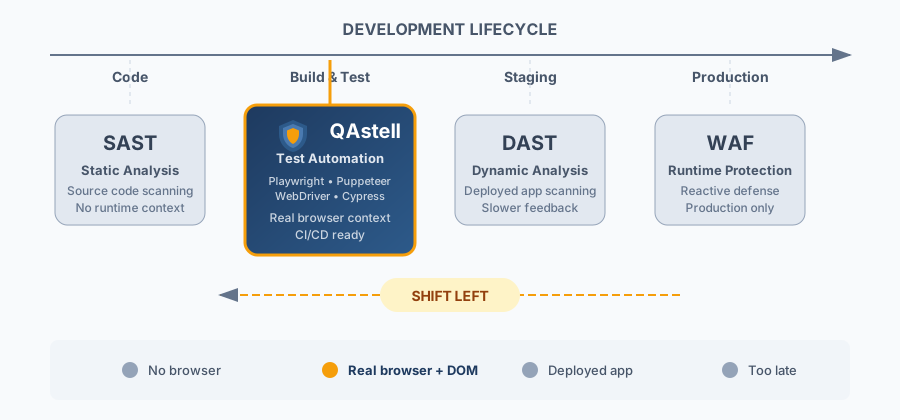
Instead, QAstell fills a gap: continuous, automated detection of common client-side security issues during functional testing. Think of it as an additional safety net that catches low-hanging fruit early, freeing your security specialists to focus on the harder problems.
Under the Hood
For advanced users debugging test failures or wanting to understand QAstell's internals, here's how it works.
The Adapter Pattern
QAstell uses a PageAdapter abstraction layer to work identically with Playwright, Puppeteer, WebDriver, and Cypress. When you pass a page object to SecurityAuditor, it automatically detects which framework you're using and wraps it in the appropriate adapter.
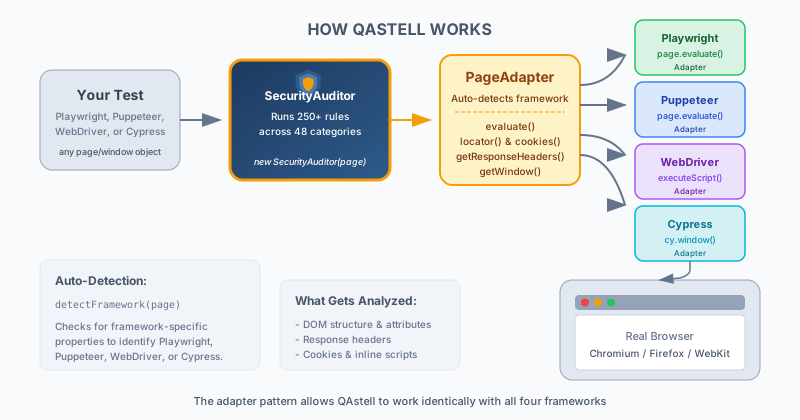
The adapter provides a unified interface for:
evaluate()- Execute JavaScript in the browser contextlocator()- Query DOM elements with CSS selectorsgetResponseHeaders()- Access HTTP response headersgetCookies()- Retrieve cookie data for analysis
Framework Detection
QAstell automatically detects your framework by checking for framework-specific properties on the page object:
// QAstell detects framework automatically
import { detectFramework } from 'qastell';

const framework = detectFramework(page);
console.log(framework); // 'playwright' | 'puppeteer' | 'webdriver' | 'cypress' | 'unknown'
Debugging Tips
Tip: Most audit issues stem from timing or context problems, not QAstell bugs. Check these common scenarios first.
1. Page Not Fully Loaded
Ensure the page is fully loaded before auditing. Dynamic content may not be present yet:
// Playwright
await page.goto(url, { waitUntil: 'networkidle' });

// Puppeteer
await page.goto(url, { waitUntil: 'networkidle0' });
2. SPA Navigation
For single-page applications, wait for navigation to complete:
// Wait for specific element to appear after navigation
await page.waitForSelector('[data-page="dashboard"]');

// Or wait for network to settle
await page.waitForLoadState('networkidle'); // Playwright only
3. Missing Response Headers
Header audits require capturing the response. Use Playwright's response from goto() or enable request interception in Puppeteer:
// Playwright - headers captured automatically
const response = await page.goto(url);

// Puppeteer - enable request interception for header capture
await page.setRequestInterception(true);
page.on('request', req => req.continue());
4. Timeouts During Audit
Large pages may need longer timeouts. If audits timeout, try:
// Audit specific categories instead of all
const results = await auditor.audit({
  include: ['headers', 'forms'], // Focus on specific areas
});

// Or exclude expensive checks
const results = await auditor.audit({
  exclude: ['third-party'], // Skip external resource checks
});
5. Headless vs Headed Mode
Some security checks may behave differently in headless mode. If you see unexpected results, try running headed:
// Playwright
const browser = await chromium.launch({ headless: false });

// Puppeteer
const browser = await puppeteer.launch({ headless: false });
6. Verbose Logging
Enable debug output to see what QAstell is doing:
// Set environment variable before running tests
QASTELL_DEBUG=true npx playwright test

// Or check individual rule results
const results = await auditor.audit();
results.violations.forEach(v => {
  console.log(`[${v.rule?.id}]`, v.message);
  console.log('  Element:', v.element);
});
7. Framework Mismatch Errors
If you see "Unrecognized page type" errors, ensure you're passing the page object directly:
// Correct - pass the page directly
const auditor = new SecurityAuditor(page);

// Wrong - don't wrap or transform the page
const auditor = new SecurityAuditor({ page }); // ❌
If auto-detection still fails (e.g., custom page wrappers), you can force the framework:
// Force Playwright when auto-detection fails
const auditor = new SecurityAuditor(page, { framework: 'playwright' });

// Force Puppeteer
const auditor = new SecurityAuditor(page, { framework: 'puppeteer' });